Free AI SEO Tools: 12 Worth Using (No Trials, Just Free)
Build a complete no-cost stack for rankings, site audits, and AI citation visibility.

Most lists of “free AI SEO tools” pad themselves with paid tools that have a 7-day trial. That’s not free. This is a curated list of 12 AI SEO tools that are actually free, with no credit card or trial-conversion gimmicks (the free tiers are real, even if they have usage limits).
I’ll cover what each one does, who it’s best for, and where the free tier hits a wall, so you can match the tool to the job. There’s also a workflow at the bottom for stitching them together into a complete free SEO stack.
How I picked these tools
- Genuinely free. Either free forever, or a meaningful free tier (not a 7-day trial that turns into a paid plan).
- SEO-specific. General AI chatbots are included only when there’s a clear, specific SEO use case.
- 2026-relevant. Includes the newer GEO and AI-citation category alongside the classic keyword/audit tools.
- Tested by real practitioners. Tools that working SEOs recommend across the SERP, Reddit threads, and SEO YouTube.
Quick comparison
| Tool | Best for | Free tier |
|---|---|---|
| Google Search Console | Performance + indexing data | 100% free, forever |
| Ahrefs Webmaster Tools | Free site audit + backlink data | Free for verified site owners |
| Bing Webmaster Tools | Free keyword research + Copilot data | 100% free, no caps |
| AIOSEO Analyzer | Instant on-page audit | 100% free, no signup |
| seo.ai free tools | SEO micro-utilities | 46 tools free, no login |
| Ubersuggest | Keyword + competitor research | 3 searches/day free |
| Semrush free account | Industry-standard data | 10 queries/day, no CC |
| RightBlogger free tools | Bundled blogger utilities | Free tier with usage limits |
| ChatGPT (free tier) | Briefs, outlines, schema | Free with daily message limits |
| Frase GEO Score | AI-answer readiness check | 100% free tool |
| Otterly.AI free tools | AI Overviews + GEO research | Free utilities, no signup |
| LLMrefs | LLM brand visibility tracking | Free account tier |
1. Google Search Console
Google Search Console is the non-negotiable free tool. It’s Google’s own data on how your site performs in search: clicks, impressions, average position, top queries, indexing status, Core Web Vitals, and now AI Overview impressions for queries where Google’s AI surfaced your pages.
Best for: any site that wants to understand its real search performance. The “AI” part is the underlying signal feed Google uses to score AI Overview eligibility.
Free tier limits: none. Free forever. The only requirement is verifying ownership of your domain.
2. Ahrefs Webmaster Tools
Ahrefs Webmaster Tools (AWT) is the free version of Ahrefs scoped to your own verified domain. You get a real site audit, the backlinks pointing to your site, and the keywords you rank for, with no credit card.
Best for: site owners who want pro-level SEO data on their own site without paying $129/month for full Ahrefs access.
Free tier limits: only your verified properties (no competitor research). Site audit caps and crawl frequency are restricted vs the paid plan, but the data is real Ahrefs data.
3. Bing Webmaster Tools
Bing Webmaster Tools is criminally underrated. The free Keyword Research tool inside it has fewer caps than Semrush’s free plan, and the tool now reports on your appearances in Bing’s Copilot AI answers. It’s the closest thing to native AI search analytics any major engine offers.
Best for: keyword research on a budget, plus visibility into how your content performs in Bing Copilot and ChatGPT (which uses Bing’s index for web search).
Free tier limits: none. 100% free, no credit card.
4. AIOSEO Analyzer
AIOSEO Analyzer runs a full on-page audit on any URL, free, with no signup. It scores titles, meta descriptions, headings, image alt text, internal links, schema, and basic technical issues. Results in under 10 seconds.
Best for: a quick “is this page well-optimized” check on any URL, including competitor pages.
Free tier limits: single-URL audits only. No bulk audits or saved history. Their paid plugin (AIOSEO Pro) handles those.
5. seo.ai’s 46 free tools
seo.ai’s tool collection is a utility belt: 46 small, focused tools for everything from SERP simulation to article rewriting to keyword density checks. No login required for most of them.
Best for: one-off SEO tasks where you don’t want to install or sign up for anything. Useful for content audits and quick optimizations.
Free tier limits: the deeper AI features (full article generation) require a paid seo.ai plan. The 46 utilities themselves are free.
6. Ubersuggest
Ubersuggest, Neil Patel’s tool, gives you keyword volume, SEO difficulty, top-ranking pages, and basic competitor analysis. The free tier is capped, but the data quality is solid for the price.
Best for: quick keyword checks and competitor URL audits without paying for a full SEO suite.
Free tier limits: three searches per day on the free plan. Beyond that you’ll be prompted to upgrade.
7. Semrush free account
Semrush offers a free account (no credit card) that gives you 10 queries per day across keyword research, domain analytics, and the on-page checker. Industry-standard data inside strict caps.
Best for: SEO professionals who want to spot-check Semrush data without committing to the $140/month entry plan.
Free tier limits: 10 queries per 24 hours. Some features (Position Tracking, Site Audit) require the paid plan.
8. RightBlogger free tools
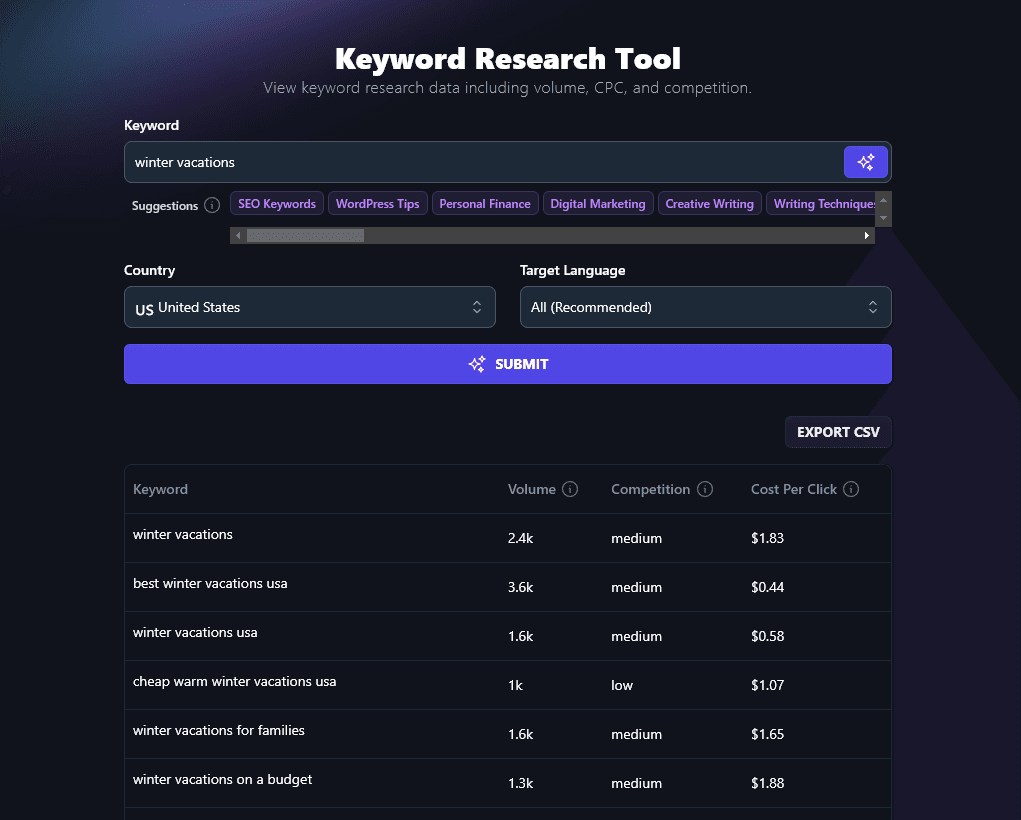
RightBlogger has a set of standalone free SEO tools, and most run right in your browser with no sign-up: a meta title generator, meta description generator, Google SERP preview, People Also Ask tool, and a permalink generator. The keyword research and content gap tools need a free account. Disclosure: this is our tool, so weigh accordingly.
Best for: bloggers who want a single set of free utilities for the day-to-day on-page SEO work that GSC and AWT don’t cover.
Free tier limits: usage caps on AI-powered tools (keyword research, content gap, etc.). The full Article Writer and Autoblogging require a paid plan starting at $49/month.
9. ChatGPT (free tier)
ChatGPT’s free tier is genuinely useful for SEO work, even if it isn’t an “SEO tool” in the traditional sense. The specific use cases that work well: drafting article briefs, generating outlines from a target keyword, writing schema markup, suggesting internal links from a sitemap paste, and rewriting meta descriptions in bulk.
Best for: the planning and drafting layer of SEO work. Not a substitute for keyword data tools, but a strong complement.
Free tier limits: daily message caps on GPT-5, with fallback to a smaller model when you exceed them. No web browsing on the free tier.
10. Frase GEO Score Checker
Frase’s GEO Score Checker is a free standalone tool that analyzes a URL or text for how likely it is to be cited by AI answer engines. Looks at structural clarity, data density, quotable statements, and source attribution, the factors that drive citation rate.
Best for: auditing your existing content for AI-citation readiness, which is increasingly distinct from traditional Google ranking.
Free tier limits: the standalone tool is free. Frase’s full editor and content optimization platform is paid.
11. Otterly.AI free tools
Otterly.AI publishes a small set of free utilities for the GEO category: a query fan-out generator, an AI crawler simulator, and a free tier of their AI Overviews tracking platform. Useful for the 2026 shift toward AI-search visibility.
Best for: SEOs who want to see what AI search engines actually generate for their target queries, without paying for a full AI-tracking platform.
Free tier limits: the standalone utilities are free. Their tracker has limited monitored queries on the free tier.
12. LLMrefs
LLMrefs is one of the newer free entries in the LLM brand visibility category. It tracks how often a brand or domain shows up in ChatGPT, Perplexity, and Gemini answers, with a free tier that covers a small number of monitored brands.
Best for: tracking your own (or a competitor’s) brand mentions across LLM answers as part of a GEO strategy.
Free tier limits: small monthly query allowance. Larger tracking volumes require a paid plan.
A free SEO workflow stitching these together
Twelve tools is a lot. Here’s how the strongest practitioners actually use the free stack.
- Foundation: Google Search Console + Ahrefs Webmaster Tools + Bing Webmaster Tools. Set these up once for any site you own. They’re the data layer everything else builds on.
- Keyword research: rotate between Bing Webmaster Tools (no caps), Ubersuggest (3/day), and Semrush free (10/day) to triangulate volume and difficulty without hitting any single cap.
- Content briefs: ChatGPT free tier for outlines and structure. Paste in your top-ranking competitors and ask it to identify subtopics they cover that you don’t.
- On-page audit: AIOSEO Analyzer for the page itself, AWT for site-wide issues, seo.ai’s tools for one-off micro-checks.
- GEO check: Frase GEO Score Checker on the published URL, plus Otterly.AI to see what AI engines currently generate for your target query.
- Monitor: LLMrefs for AI citation tracking, GSC for Google clicks/impressions, AWT for backlink growth.
Free AI SEO tools FAQ
Are there any AI SEO tools that are actually free, not just a trial?
Yes. Google Search Console, Ahrefs Webmaster Tools, Bing Webmaster Tools, AIOSEO Analyzer, and seo.ai’s 46 utilities are all free forever (or free for verified site owners). The rest of the list above has meaningful free tiers that stay usable well past the first week.
Can I do SEO without paying for any tools?
Yes, especially for a single site. The combination of GSC + AWT + Bing WMT + ChatGPT free tier covers about 80% of what most bloggers and small business owners need. You’d only outgrow the free stack when you need to track competitors at scale or run bulk technical audits.
What’s the best free tool for tracking AI Overviews and ChatGPT citations?
Bing Webmaster Tools (for Bing Copilot data), Otterly.AI (for cross-engine AI Overviews tracking), and LLMrefs (for ChatGPT/Perplexity/Gemini brand mentions). None of them is complete on its own; together they cover the major AI-search surfaces.
Is ChatGPT good for SEO?
For specific tasks, yes: drafting briefs, writing schema markup, generating outlines, rewriting meta descriptions. For keyword data, no. ChatGPT doesn’t have real search volume or competition data. Pair it with a tool that does (Bing WMT, Ubersuggest, Semrush free).
Does Google have a free AI SEO tool?
Google Search Console is the closest. It’s not branded as an “AI” tool, but the data it surfaces (including AI Overview impressions, query-level CTR, and indexing status) is the most actionable AI-related SEO data Google publishes.
Picking your free SEO stack
You don’t need 12 tools to do free SEO well. Pick the foundation (GSC + AWT + Bing WMT) and add 1-2 specialty tools for the workflow gaps you actually hit. The biggest mistake on a free stack is using too many overlapping tools instead of using a few well.
If GEO and AI search visibility matter for your niche, prioritize the free GEO tools (Frase GEO Score, Otterly.AI, LLMrefs) over yet another keyword tool. The category is moving fast, and the free tools are the leading edge.

Article by
RightBlogger Co-Founder, Ryan Robinson teaches 500,000 monthly readers to grow online businesses. He is a recovering side project addict.


Automated SEO Blog Posts That Work
Try RightBlogger for free, we know you'll love it.





Leave a comment
You must be logged in to comment.
Loading comments...