How to Fix Spelling & Grammar with ChatGPT in 2026 (Prompts)
Copy prompts that preserve your meaning, explain errors, and suit emails, essays, or personal writing.

ChatGPT is a powerful tool that can be incredibly useful when it comes to correcting text errors. Whether you need a quick ChatGPT grammar check to fix spelling mistakes or polish your writing, ChatGPT has got you covered.
Web browsers like Chrome include a basic spell checker, but they don’t catch grammar mistakes and miss a lot. Using ChatGPT as a grammar checker fills that gap with AI-powered writing support that catches errors a spell checker never would.
What You Need to Know
- ChatGPT can correct grammar and spelling errors in any text.
- Simple prompts enable fast grammar checks and clear, edited output.
- Users can ask ChatGPT for explanations of errors, along with corrections.
- AI grammar checks can improve clarity, professionalism, and readability.
- Tools like RightBlogger Chat and other AI chatbots offer similar functions.
Here’s a walkthrough of using ChatGPT to improve your writing by grammar checking and fixing spelling mistakes. This is as simple as using ChatGPT prompts to get the result you want.
Here’s how it works.
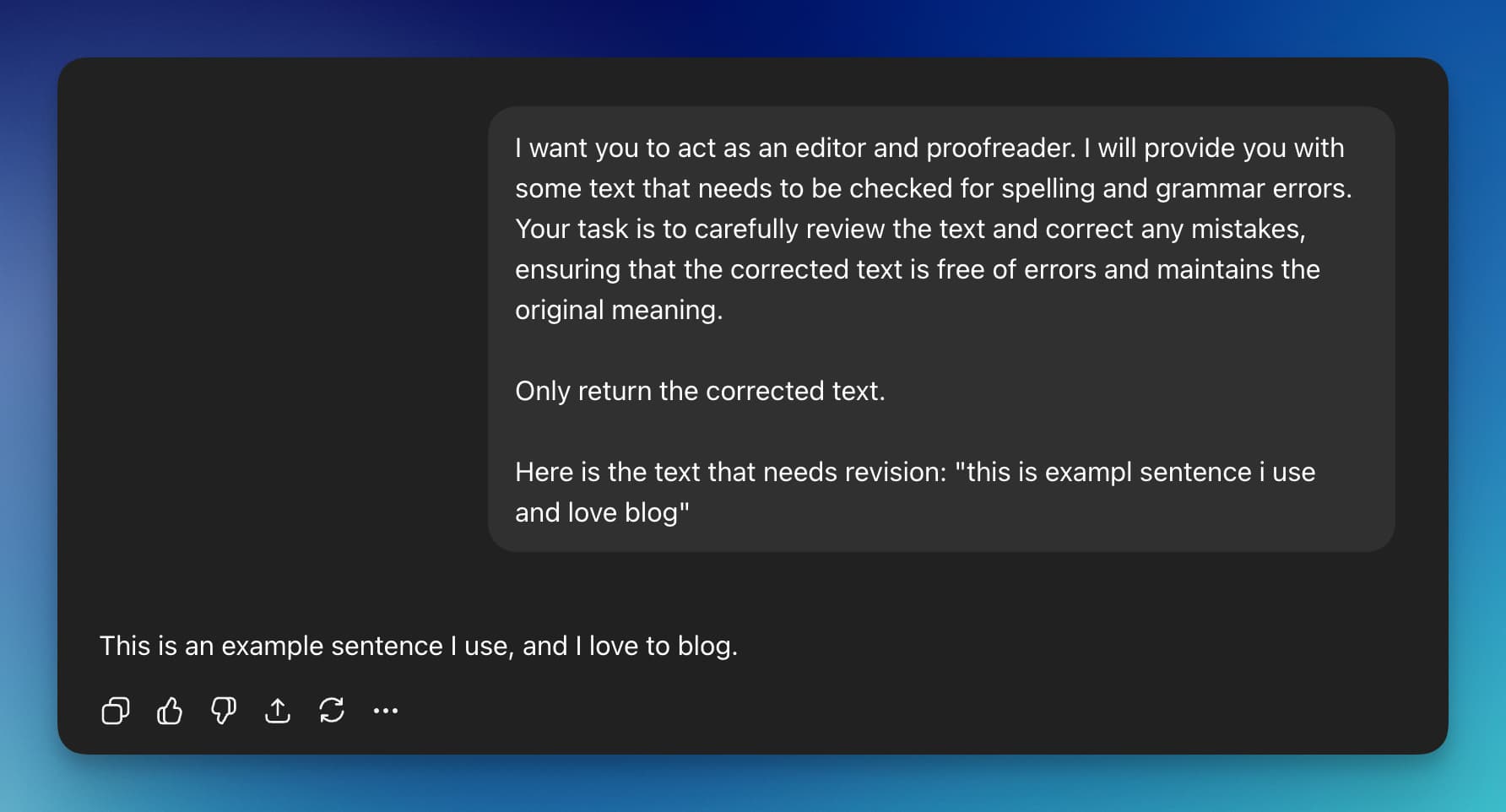
While proofreading is important for most content, it’s easy to miss a grammatical mistake, especially in a large amount of text. ChatGPT makes it easy to quickly fix all your grammar and return error-free text. (For more advanced editing prompts, see our 13 best ChatGPT prompts for editing.)
First you’ll need to access ChatGPT via chatgpt.com. Any of the ChatGPT models will work for this, whether you stay on the fast Instant setting or switch to one of the higher reasoning levels. Of course if you are a RightBlogger subscriber you can use the chat tool in RightBlogger.
ChatGPT Prompt to Fix Grammar (Grammar Check)
Here is the prompt we will use in ChatGPT to fix grammar with OpenAI’s AI chatbot:
Simply replace “[YOUR TEXT]” with any text you want to correct. This includes text with grammar mistakes or misspellings.
Now that our prompt is written just hit the enter key to initiate ChatGPT in the grammar correction process.
The errors in grammar and spelling that ChatGPT finds will be instantly corrected in the response from ChatGPT. You can quickly copy and paste the resulting corrected text or ask ChatGPT for what changes it did if you want a detailed breakdown of the corrections.
I love to use this technique for:
- Checking social media posts for spelling mistakes
- Correcting grammar for paragraphs in blog posts
- Making sure emails have no typos
- Posting reviews on Amazon or Google Maps
It’s great to have a fresh set of eyes on your text before publishing, and a LLM with natural language processing is valuable for this purpose.
Beginners to languages who are trying to learn a language will also probably enjoy a prompt like the one below that explains what grammar and spelling mistakes were in the text. While artificial intelligence is great for writing, using it as a grammar checker can be great for bringing your writing skills to the next level.
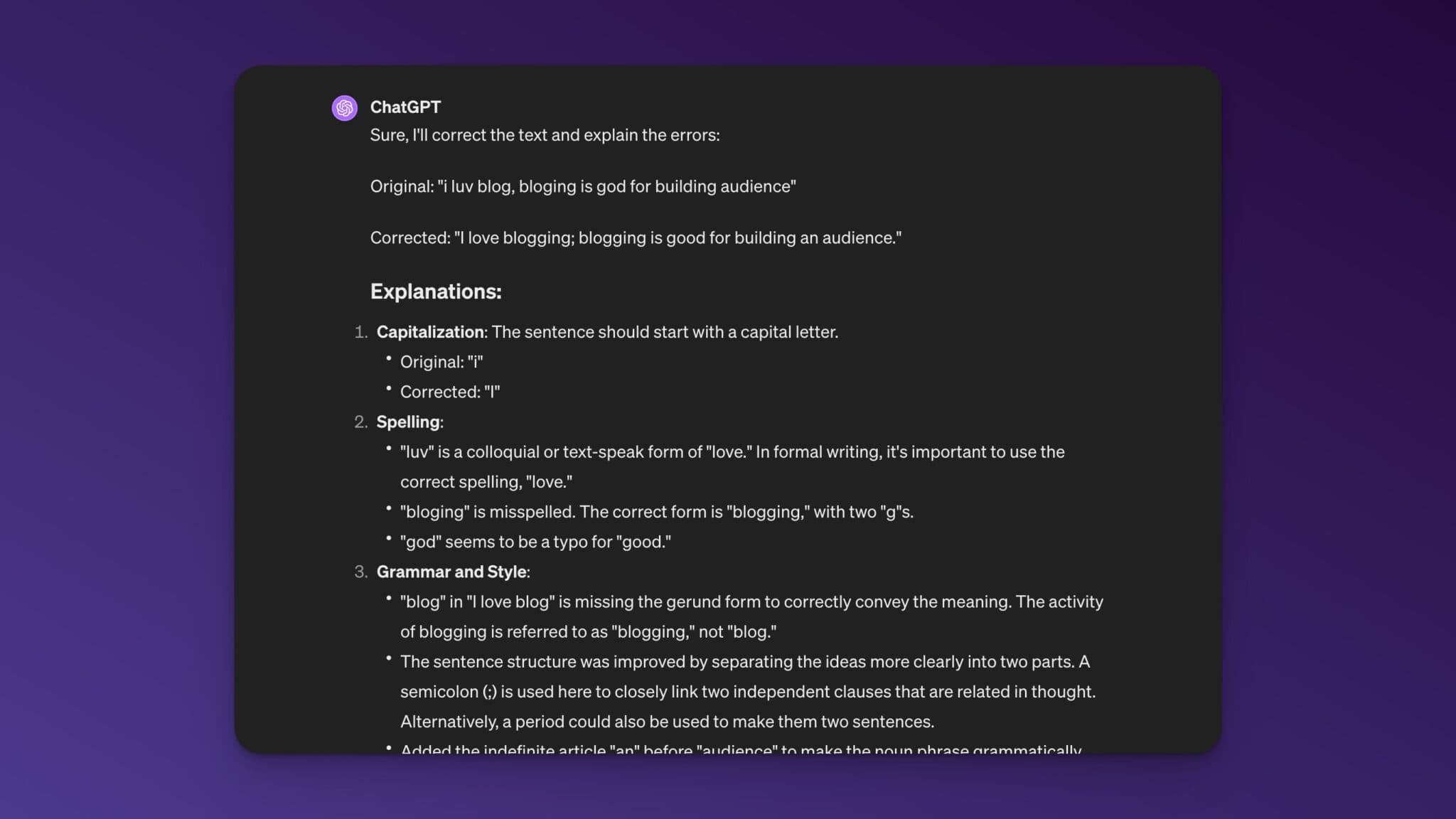
Your writing will now have a more polished and professional appearance after being edited and proofread by ChatGPT. It effortlessly improves sentence structure and corrects spelling and grammar mistakes.
You can also use ChatGPT for much more, from paraphrasing to acting as a writing assistant. ChatGPT is quickly becoming an essential part of writer’s workflows. We have a full post with even more ChatGPT writing prompts templates.
When Should You Not Use ChatGPT for Grammar Fixes?
While ChatGPT is great for correcting grammar and spelling mistakes, there are a few situations where you should be more careful.
AI is powerful, but it is not perfect.
Technical or Legal Documents
If you are editing:
- Legal contracts
- Medical information
- Academic research papers
You should double check everything carefully. Even small wording changes can alter the meaning of important documents.
For these types of writing, AI can help spot basic grammar issues, but a human review is still important.
Sensitive or Private Information
Avoid pasting confidential information into any AI tool.
This includes:
- Personal identification details
- Client data
- Private business information
It is always best practice to keep sensitive material secure.
Creative Writing and Strong Personal Voice
If you are writing a personal story, opinion piece, or creative content, you may not want ChatGPT to fully rewrite your text.
Instead, try a prompt like this:
This allows you to keep your original voice while still fixing mistakes.
More Grammar Prompts for Specific Situations
Different writing contexts call for different prompts. Here are a few more you can copy and use:
For business emails:
For academic or research writing:
For non-native English speakers:
ChatGPT works best as a writing assistant, not a replacement for your thinking. Write your draft first, then use AI to polish it.
Used correctly, it can improve clarity and professionalism while still keeping your content authentic.
Frequently Asked Questions
How accurate is ChatGPT for grammar and spelling corrections?
ChatGPT catches most errors in grammar and spelling and returns accurate corrections. It may still miss rare or complex issues.
Do I need to pay to use ChatGPT for editing?
A free account at chatgpt.com offers basic editing. Paid plans, which unlock the higher reasoning models, may provide better results, but the free version works for most grammar and spelling checks.
Can ChatGPT explain its corrections?
Yes, if you prompt it to explain, ChatGPT lists each error and provides the corrected version.
Is it safe to paste sensitive information into ChatGPT?
It’s best not to submit confidential data, as ChatGPT processes input on external servers.
Are there alternatives to ChatGPT for grammar checking?
Yes, there are tons of ChatGPT alternatives like RightBlogger Chat, Gemini, Claude, Grok, and browser extensions offer similar grammar correction features.
Can ChatGPT proofread my essay?
Yes. Paste your essay into ChatGPT with a prompt asking it to fix grammar and spelling while keeping your original meaning. For academic work, add instructions to maintain formal tone and preserve technical terms.
Is ChatGPT better than Grammarly for grammar checking?
They work differently. Grammarly runs in real time as you type and catches errors inline. ChatGPT works in batches: you paste text, it returns a corrected version. Grammarly is better for live editing in Google Docs or email. ChatGPT is more flexible for one-off checks, rewriting, and getting explanations of why something was wrong.
Does ChatGPT correct punctuation too?
Yes. ChatGPT fixes commas, periods, semicolons, apostrophes, and other punctuation issues alongside grammar and spelling. The prompts in this guide cover punctuation by default.
Start Using ChatGPT as Your Grammar Checker
Improving your writing skills through the use of ChatGPT or an AI-powered tool for text correction is a simple and efficient option. Especially if you aren’t a native speaker of a language like English this is a great way to fix grammar errors.
The best part of correcting text you wrote is that you will have to worry about plagiarism less since it’s just fixing content you wrote.
Of course the tips and prompt I’ve shared in this post can also be used on other chat bots like Claude, Grok, Gemini, Meta AI, and RightBlogger Chat. I’ve found most models to work really well at grammar and spelling corrections.

Having your text checked for grammar and spelling errors is as easy as a few clicks. Put an end to self-conscious writing and welcome in content perfected by AI. Having correct grammar in the content you create can improve readability and SEO of your website plus help learners of a new language.
Check out our full free grammar checker tool inside of RightBlogger along with a full suite of autoblogging tools built from the ground up for bloggers. Including autoblogging, SEO reports, and auto-optimizations for blog posts.

Article by
RightBlogger Co-Founder, Andy Feliciotti builds websites and shares photography and travel adventures on YouTube and his travel blog.

Automated SEO Blog Posts That Work
Try RightBlogger for free, we know you'll love it.





Leave a comment
You must be logged in to comment.
Loading comments...