How to Use the Additional Instructions Field
Ever felt like you could squeeze a bit more juice out of RightBlogger’s tools? Well, you’re in for a treat. Today, we’re diving deep into a gem that’s been somewhat under the radar: the Advanced Instructions field. Trust me, knowing how to leverage this can truly transform your content creation game and fine-tune your results.
So, let’s get right into it.
What Is the Advanced Instructions Field?
Imagine having a magic wand that lets you fine-tune your content requests to your exact needs. That’s what the Advanced Instructions field in RightBlogger is like.
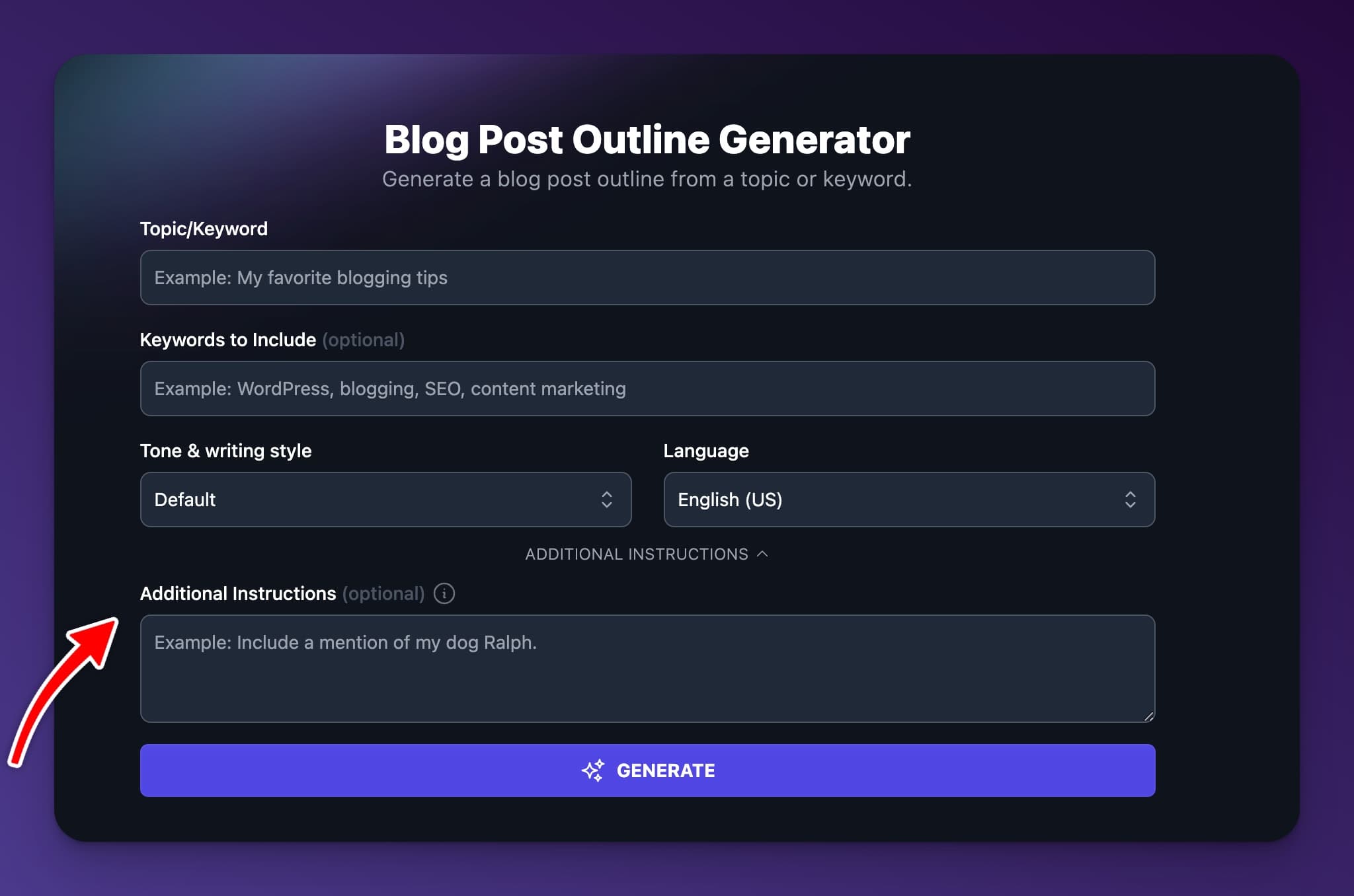
Found under the advanced settings in most of our tools, this little box is where you can communicate directly with the AI, guiding it to produce exactly what you’re envisioning.
How Does It Work?
Let’s say you’re working on generating some catchy post titles about hiking. It’s a broad topic, right? By typing in “best hiking trails” in the blog post title tool and hitting generate, you’ll get a variety of titles.
But here’s where the magic happens: You realize you want titles focused on photography. You can write something like “My hiking blog is about hiking as a photographer” into the Advanced Instructions field, and the AI refines its outputs to match your specific needs to be for a photographer audience.
This is just the tip of the ice berg of what you can do with the Additional Instructions field.
Tips for Using Additional Instructions
The beauty of the Advanced Instructions field lies in its flexibility. Whether you’re aiming for a particular tone, targeting certain keywords, or even asking for something fun like clickbait titles, this feature has got you covered.
Tailoring Content with Precision
Got a target year in mind or need to emphasize puppies over full-grown dog breeds? Just specify your requirements in the field. This ensures that the content you’re generating is not just high quality, but also tailored precisely to your current needs.
Keyword and Phrase Inclusion
SEO enthusiasts, rejoice! The Advanced Instructions field lets you seamlessly integrate those all-important keywords and phrases into your generated content, making sure your blog stays on good terms with search engines.
Creativity Without Limits

Ever wanted to add a creative twist to your prompts? This field allows you to instruct the AI to bend the rules a bit, pushing the boundaries of standard content creation.
Whether it’s crafting something with a humorous undertone or engineering the perfect clickbait headline, your imagination is the only limit.
Conclusion
The Advanced Instructions field in RightBlogger is more than just a feature; it’s your creative co-pilot. By harnessing its capabilities, you can ensure that every piece of content produced is aligned with your vision, optimized for your audience, and ready to make an impact. So, next time you’re gearing up to use RightBlogger, remember to tap into this powerful tool. Your blog will thank you for it.
What should I write in the Advanced Instructions field?
Write short, clear details that explain what you want the AI to do. Think of it like adding extra direction so RightBlogger can generate results that match your goal.
Start with audience, topic angle, and format. For example: “Write for beginner hikers who love photography. Use short, punchy titles. Include the phrase ‘mountain photos.’”
You can also set limits like word count, tone, or what to avoid. The more specific your instructions are, the fewer rewrites you usually need.
If you are not sure how to phrase your request, try the Prompt Improver tool to turn rough ideas into clearer instructions.
Where do I find the Advanced Instructions field in RightBlogger tools?
You can find it under the advanced settings in most RightBlogger tools. Look for a small text box where you can add extra guidance before you generate content.
This field is helpful when your main prompt is too broad. Adding one or two lines of direction can make the output much closer to what you want.
If you want a quick walkthrough with examples, see the Instructions help page.
How do Advanced Instructions help with SEO and keyword use?
Advanced Instructions let you tell the AI which keywords or phrases to include, so your content stays focused. This helps you create content that matches search intent and is easier to optimize.
You can ask for specific keywords in headings, title ideas, or meta-style descriptions. You can also request related terms, questions people ask, or a certain year to keep the content current.
Keep it natural. A good instruction is: “Include the keyword ‘best hiking trails for photographers’ once in the title and 2 to 3 times in the post, without stuffing.”
After you publish, you can improve results even more by pairing your content with SEO Reports to spot gaps and fix them faster.
Can I use Advanced Instructions to control tone and writing style?
Yes. You can use Advanced Instructions to set the tone, reading level, and style so the content sounds like you.
For example, you can request: “8th grade reading level, friendly tone, short paragraphs, and no hype.” You can also specify things like “use bullet points” or “keep sentences under 15 words.”
If you want a consistent voice across all your posts, use RightBlogger’s MyTone settings to store your style preferences and reduce repeated instructions.
What are some examples of Advanced Instructions that improve results fast?
Good instructions are specific, simple, and easy to follow. They tell the AI what to include, what to avoid, and who the content is for.
Examples you can copy:
- “Write 10 blog titles for busy parents. Add a curiosity hook. Avoid clickbait words like ‘shocking.’”
- “Focus on puppies, not adult dogs. Mention crate training and teething.”
- “Include 2026 in the headline. Make it sound up to date and practical.”
If you want to learn the basics behind why these prompts work, read Prompt engineering basics.
How can RightBlogger help me use Advanced Instructions in a full writing workflow?
Advanced Instructions help you get better outputs at every step, from titles to full drafts. You can use them to keep your topic angle consistent and reduce edits later.
For long-form content, pair strong instructions with the RightBlogger AI Article Writer. Ask for things like an outline style, section length, and a clear call to action.
If you want to repeat the same steps across posts, build a repeatable process with Studio workflows. This makes it easier to create content that stays on brand and on topic.
New:Autoblogging + Scheduling
Automated SEO Blog Posts That Work
Try RightBlogger for free, we know you'll love it.
- Automated Content
- Blog Posts in One Click
- Unlimited Usage