Nofollow Link: The Bloggers Guide
Use rel="nofollow" for competitors, sponsored posts, and user links without passing SEO value.
Are you a blogger looking to control the SEO value you give to external sites when linking to them? NoFollow links are the perfect solution. By setting the relationship of a link to “nofollow,” you can tell search engines not to follow the link or give it any SEO value.

What is a NoFollow Link?
A NoFollow link is an HTML attribute that asks search engines not to pass link equity (SEO value) to the page you are linking to. Since March 2020, Google treats rel="nofollow" as a hint rather than a strict directive, so it may still crawl the link and factor it in. Treat nofollow as a strong signal about how you want a link counted, not as a guarantee.
Why Use NoFollow Links?
There are several reasons why you might want to use NoFollow links:
- Linking to Competitors: If you need to link to a competitor’s website, using a NoFollow link ensures that you’re not inadvertently boosting their search engine rankings.
- Paid Links or Sponsored Content: If you’re being paid to link to a website or promoting sponsored content, it’s important to use NoFollow links to comply with search engine guidelines and avoid potential penalties. Keep in mind you’ll also want to add
rel="sponsored"to sponsored links. Google introduced it alongsiderel="ugc"for user-generated content, and you can combine attributes when a link fits more than one category. - User-Generated Content: If your blog allows user comments or has forums, adding NoFollow to links within user-generated content can help prevent spam and discourage people from leaving links just for SEO purposes. Typically WordPress does this for you in the comments section.
How to Create a NoFollow Link
Creating a NoFollow link is simple. Just add the rel="nofollow" attribute to your HTML link tag, like this:
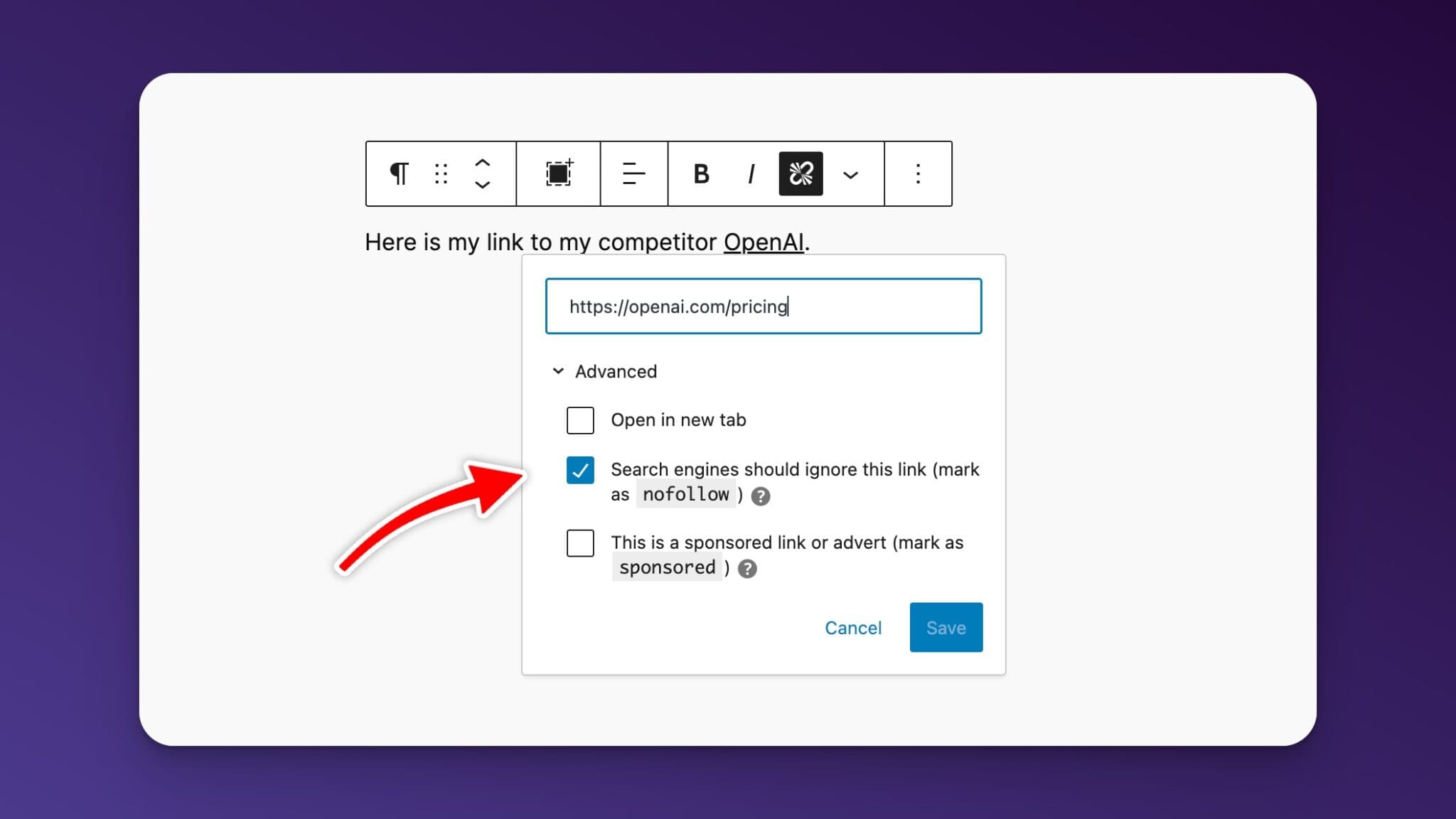
<a href="https://example.com" rel="nofollow">Example Website</a>Of course if you’re using the WordPress block editor you can click the “advanced” area and select that you want the link to be set to nofollow without editing HTML.
Checking if a Link is NoFollow
To check if a link on a website is using the NoFollow attribute, simply:
- Right-click on the link
- Select “Inspect” or “Inspect Element” from the context menu
- Look for the
rel="nofollow"attribute within the link’s HTML
If the attribute is present, the link is NoFollow. If it’s not there, the link is DoFollow, meaning it passes on SEO value.
Using WordPress Plugins for NoFollow Links
If your blog runs on WordPress, you can easily manage NoFollow links using plugins. One popular option is the “External Links” plugin, which allows you to automatically add the NoFollow attribute to all external links on your site.
What’s great about these plugins is that they often include an “allow list” feature. This enables you to specify certain links or domains that you want to remain DoFollow, giving you granular control over which external sites receive SEO value from your blog.
When to Use Nofollow Links
NoFollow links are a powerful tool for bloggers looking to control the flow of SEO value from their site. By using the rel="nofollow" attribute strategically, you can link to external resources without worrying about unintentionally boosting their search engine rankings.
Whether you’re linking to competitors, managing sponsored content, or dealing with user-generated links, understanding and utilizing NoFollow links is an essential skill for any blogger. So, start implementing NoFollow links today and take control of your blog’s SEO!
Automated SEO Blog Posts That Work
Try RightBlogger for free, we know you'll love it.




