Content Repurposing With AI: Workflow, Examples, and Tools
Turn blog posts, videos, webinars, and reports into scripts, social posts, and newsletters.


Content repurposing means taking something you’ve already published, like a blog post, YouTube video, podcast episode, or webinar, and reshaping it into new formats for other channels. One strong article can become a video script, a newsletter, three LinkedIn posts, and a carousel.
AI makes this fast. It handles the slow parts (transcribing, summarizing, and rewriting for each platform), so your time goes into picking what’s worth reusing and editing the output.
This guide covers a five-step workflow for repurposing content with AI, eight one-to-many examples, how to republish without creating SEO problems, and the tools we’d use for each job.
What Is Content Repurposing?
Content repurposing is adapting existing content into a different format, or for a different platform, so it reaches people who would never see the original. A blog post turned into a YouTube video is repurposing. So is a webinar split into five blog posts, or a podcast episode cut into short clips.
It often gets mixed up with three related habits:
| Practice | What you do | Example |
|---|---|---|
| Reposting | Share the same piece again on the same channel | Resharing a popular LinkedIn post a year later |
| Cross-posting | Publish the same piece, mostly unchanged, on several channels | Uploading one vertical video to TikTok, Reels, and Shorts |
| Syndication | Republish a full article on another site with a canonical link back | Importing a blog post into Medium |
| Repurposing | Change the format and rewrite it for a new audience | Turning a 2,000-word guide into a 60-second video script |
Repurposing takes the most work of the four. It also pays off the most, because each version is built for the way people actually use that platform.
Why Repurpose Content?
A good piece of content takes research, writing, recording, and editing. Repurposing gets more out of that work without starting from zero every time.
Reach Audiences on Other Platforms
Different social media platforms attract distinct audiences. Some of your readers will never watch a YouTube video, and plenty of YouTube viewers will never read a blog post. Repurposing reaches both groups with the same core message, adapted for each one. Knowing your target audience tells you which formats are worth the effort.
Spend Less on Each Piece
The research, ideas, and examples already exist. Turning a YouTube video into a blog post, or a research report into a carousel, skips the most expensive stages of creation. Most of the remaining work is editing.
Keep Your Message Consistent
When one source feeds every channel, your audience hears the same ideas everywhere, in a voice they recognize. AI can keep that tone steady across formats. In RightBlogger, MyTone saves your writing style, whether that’s authoritative, playful, or relaxed, and applies it across our tools.

That way a LinkedIn post, a newsletter, and a video script drafted from the same article all sound like the same person wrote them.
Show Up in More Places in Search
A video and an article on the same topic compete in different places. The video can surface in YouTube search and video results, while the article can rank in standard web results and get quoted in AI answers. Publishing both gives you two chances to be found for the same idea.
Give Loyal Readers More Value
Your email subscribers and followers already like your work. Repurposed content keeps showing up for them in the places they already check, which keeps your brand top of mind between bigger launches.
Repurpose Content With AI in 5 Steps
Repurposing works best as a habit you repeat with each new post. This is the workflow we recommend.
1. Pick Content Worth Repurposing
Start with pieces that have already proven themselves. Your top pages in Google Search Console, your most-watched videos, and your emails with the best click rates all have demand behind them. Evergreen topics beat news posts, since they stay useful for years.
Refresh anything outdated before you reuse it. Repurposing a post with old prices or retired features just spreads the mistakes to more places.
2. Get the Source Into Text
AI tools work from text, so audio and video need a transcript first. RightBlogger’s Transcribe Audio or Video tool handles recordings, and the YouTube Video Transcript tool pulls the transcript from any YouTube URL. Descript also transcribes recordings automatically while you edit.
3. Pull Out the Core Ideas
Most repurposed pieces use only part of the source. Ask AI to list the main points, the best quotes, any data, and the stories that make the piece memorable. Our Key Takeaways tool does this from text, an article URL, or a YouTube video URL, and the Summarizer condenses text, webpages, and videos.
That list becomes your raw material. One idea might carry a whole LinkedIn post, while three related ones could fill an Instagram carousel.
4. Rewrite for Each Channel
This is the step where most repurposing falls apart. A blog intro pasted into LinkedIn reads like an ad for a blog post. Each platform needs its own hook, length, and structure, so tell the AI which platform you’re writing for, who reads it, and what you want them to do next.
- On LinkedIn, put the point in the first two lines and keep paragraphs to a sentence or two.
- For X, use one sharp idea per post, or a short thread that builds to a takeaway.
- Instagram carousels read best with one idea per slide and the caption doing the explaining.
- A newsletter can be more personal: why the post matters to subscribers, plus one clear link.
- YouTube scripts need a spoken, conversational rhythm and a hook in the first few seconds.
5. Edit, Publish, and Link Back
Read every AI draft before it goes out. Check facts and numbers against the source, cut generic lines, and add anything only you would know. Then publish, link each new piece back to the original, and note which formats bring in clicks or replies so you know what to repeat.
A content promotion checklist helps you cover each channel after a post goes live.
8 Content Repurposing Examples With AI
These eight combinations cover most of what bloggers and creators repurpose, along with the tools that handle the AI part of each.
1. Turn Blog Posts Into YouTube Videos
A how-to blog post already has the shape of a good video: a problem, a set of steps, and a result. AI turns that structure into a spoken script, so you never start recording from a blank page.

RightBlogger’s Blog Post to YouTube Video Script tool takes a post and writes a conversational script you can read on camera. It’s one of the most practical uses of AI for YouTubers, because the research and structure are already done.

If you’d rather not appear on camera, an AI video tool like Steve AI can turn a script into a finished video. For tutorials, a screen recording with a voiceover works just as well.
2. Turn YouTube Videos Into Blog Posts
The reverse works too. Plenty of people prefer reading, and a written version lets them skim to the step they need instead of scrubbing through a video. It also gives the topic a page that can rank in Google.
RightBlogger co-founder Ryan Robinson shows the whole process in this walkthrough:

Paste a YouTube URL into the Video to Blog Post tool and it drafts an SEO-optimized article from the video.

Before you publish, add screenshots, links, and any steps the video skipped. A post that reads like a cleaned-up transcript gives readers little reason to choose it over the video.
If you upload often, RightBlogger’s autoblogging can connect to your YouTube channel and turn each new upload into a blog post with the video embedded.
3. Cut Long Videos Into Short Clips
A 20-minute video or podcast recording usually holds several moments that stand on their own. Clips of those moments can run on TikTok, Instagram Reels, and YouTube Shorts, each one pointing viewers to the full version.
OpusClip finds clip-worthy moments in long videos, adds captions, and reframes the shot for vertical screens. Descript’s Create Clips feature does a similar job inside its editor. Keep captions on all clips so it still makes sense with the sound off, and borrow hooks and pacing ideas from our short-form video tips.
4. Turn Webinars and Podcasts Into Blog Posts

A one-hour webinar or podcast episode often covers several topics. Split it into one blog post per topic and pull direct quotes from the speakers. Quotes from people with real experience support the E-E-A-T signals Google describes for helpful content.
Start with a transcript, then use RightBlogger’s Podcast to Blog tool to draft a post from an episode URL or audio file. The same transcript can feed social posts, quote graphics designed in Canva, and short audio clips. Services like The Podcast Consultant focus on making sure podcasts and video recordings start with high-quality audio and structured content, which makes these repurposed pieces even more effective.
5. Turn Blog Posts Into Social Media Posts
Every blog post holds a handful of facts, tips, and opinions that work as standalone social posts. AI can find them and rewrite each one for the platform you’re posting to.

RightBlogger’s social tools include LinkedIn Post, Facebook Post, Instagram Caption, and Pinterest Pins. For video, YouTube Video to Tweets turns a video into a set of X posts.
To share new posts automatically, connect your social accounts in RightBlogger. The Solo plan covers LinkedIn, and Pro adds X, Facebook, Threads, Instagram, and Pinterest. For other options, see our roundup of AI social media tools.
6. Turn Blog Posts Into Newsletters
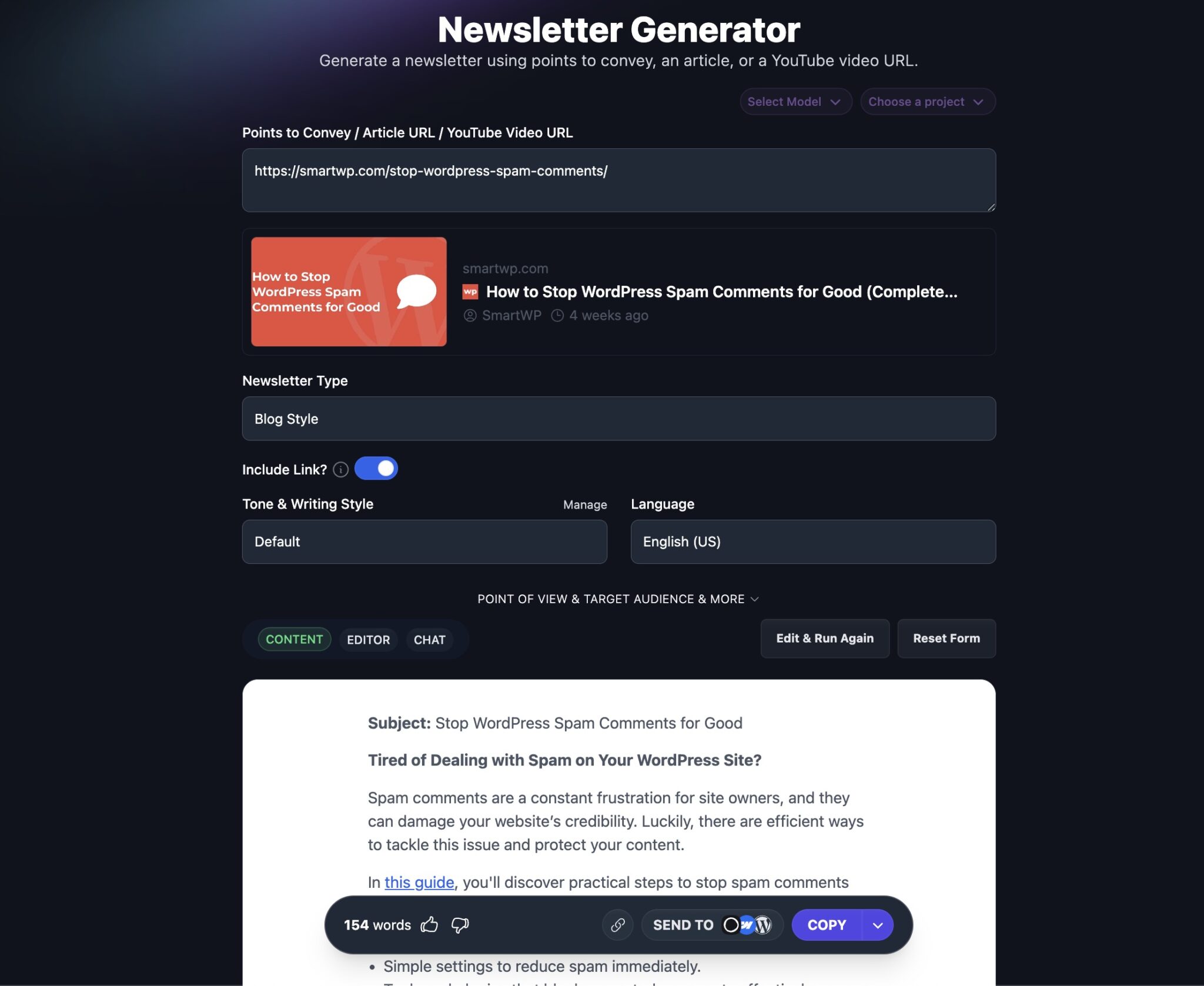
Your email list is the audience most likely to read a new post right away. Writing a separate newsletter for each post takes time, though, so let AI draft it from the post itself: a short hook, why the post matters to subscribers, and a link to read more.
RightBlogger’s Newsletter Generator builds the email from an article, a YouTube video URL, or a list of points you want to make. Rewrite the opening in your own words, then send.
7. Turn Newsletter Archives Into Blog Posts
If you’ve been sending newsletters for a while, your archive is full of essays and tips that only subscribers ever saw. The best issues already proved they get a response. Turning them into blog posts gives them a permanent, searchable home on your site.
Expand each one with headings, examples, and internal links so it works for a stranger who lands on it from Google. Our guide to turning newsletter archives into SEO blog posts covers which issues to pick and how to restructure them.
8. Turn Research Into Carousels and Videos
Original research, survey results, and benchmark reports are full of numbers people like to share. Pull the five most surprising findings and give each one a slide, with a single number in large type and one sentence of context.
Canva templates make these carousels quick to design, and the same slides can become a short captioned video for Reels or TikTok. Always link to the full report so people can check the method behind the numbers.
How to Repurpose Without Hurting SEO
Google has said there’s no such thing as a “duplicate content penalty”. Copies can still cause trouble, though. When two versions of the same article exist, Google picks one to show, and it isn’t always yours. These rules keep the original in charge.
Keep the Full Version on Your Site
Your own site should host the most complete version of each piece. That’s the page with your internal links, your email signup, and your product. Other platforms get adapted versions that link back to it.
Set a Canonical Link on Medium
Medium lets you republish a full article without competing with yourself. Its Import a story tool pulls in your post, backdates it to the original publish date, and adds a canonical link pointing to your URL.
If you paste an article in by hand instead, set the canonical link yourself. Open the story’s Advanced settings, check “This story was originally published elsewhere,” and enter your original URL.
Write Native Posts for LinkedIn
LinkedIn articles have no canonical setting, so a full copy there can’t point search engines back to your original. Post a shorter take written for the feed instead, built around one idea from the article, with a link to the full version.
Update Instead of Duplicating
Repurposing on your own site has its own trap. A second post on the same topic, with similar wording, can leave two of your pages competing for the same searches. Update and expand the original instead. If Search Console flags pages as “Duplicate without user-selected canonical,” our guide to fixing duplicate canonical errors walks through the fix.
Add Something the Original Didn’t Have
A transcript pasted into a blog post, or a blog post read aloud on camera, adds little. Each version should add what its format does best: screenshots and links in an article, demonstrations in a video, a personal note in a newsletter.
Best AI Tools for Content Repurposing
No single tool covers every format. These six handle the jobs that come up most, and most creators end up pairing two or three of them.
| Tool | Best for | Free option |
|---|---|---|
| RightBlogger | Written repurposing: video and podcast to blog, blog to social posts and newsletters | Free plan, 2,000 AI words a month |
| ChatGPT | Flexible rewriting with your own prompts | Free plan |
| Descript | Editing audio and video by editing the transcript | Free plan |
| OpusClip | Cutting long videos into short clips | Free plan, 60 credits a month |
| Repurpose.io | Auto-posting videos from one platform to others | 14-day trial, 10 free videos |
| Canva | Carousels, quote graphics, and slide-style videos | Free plan |
1. RightBlogger
RightBlogger is our AI content platform for bloggers, with 90+ tools. The repurposing ones include Video to Blog Post, Podcast to Blog, Blog Post to YouTube Video Script, Newsletter Generator, and post tools for LinkedIn, Facebook, Instagram, and Pinterest. All of them can write in your saved MyTone style. Paid plans start at $49/month billed annually, with unlimited AI words. Skip it if you mainly need video editing or clipping, because it works with text.
2. ChatGPT
ChatGPT can rewrite anything you paste into it: summarize a post, draft five LinkedIn hooks, or turn a transcript into an outline. It’s flexible, and there’s a free plan. The tradeoff is setup. You write the prompts, paste in the source, and keep the voice consistent yourself each time. Check its output against your original, since it can add details that were never there.
3. Descript
Descript lets you edit audio and video by editing an automatic transcript, so deleting a sentence from the text deletes it from the recording. Its Create Clips feature turns long videos and podcasts into clips, and its AI assistant, Underlord, helps with rough cuts. There’s a free plan. It’s the strongest pick here for podcasters and video creators, and more than you need for text-only repurposing.
4. OpusClip
OpusClip turns long videos into short clips for TikTok, Reels, and Shorts. It picks the moments, adds captions automatically, and uses AI object tracking to keep the speaker centered when it reframes for vertical screens. After a 7-day Pro trial, the free plan includes 60 credits a month. It only makes clips, so pair it with a writing tool for everything else.
5. Repurpose.io
Repurpose.io is a distribution tool. Connect your accounts, post a video on one platform, and it republishes it to the others with watermarks removed and the size adjusted for each one. It connects to YouTube, TikTok, Instagram, Facebook, LinkedIn, Pinterest, X, and more. Plans start at $35/month after a 14-day trial. Skip it if most of your repurposing is written content.
6. Canva
Canva is the quickest way to turn key points into visuals. Carousels, quote graphics, infographics, and slide-style videos all start from templates, and the free plan covers most of what you need. Write your copy first, then drop it into a design, so the design step stays fast and your words don’t get trimmed to fit a template.
Content Repurposing FAQs
What are some examples of content repurposing?
Common examples include turning a blog post into a YouTube script, a YouTube video into a blog post, a webinar into several articles, a podcast episode into short clips, a blog post into a newsletter, and a research report into an Instagram carousel.
How often should you repurpose content?
Build it into publishing. When a new piece goes live, plan two or three repurposed versions for it right away. Then revisit your best performers every few months, since a post that’s still bringing in traffic is worth reusing again in a new format.
Is repurposed content bad for SEO?
No. There’s no duplicate content penalty, and adapted versions on other platforms can send readers back to you. Problems start when full copies compete with your original, so keep the complete version on your site and use canonical links when you syndicate.
Is it ethical to repurpose content?
Yes, when the content is yours or you have permission to use it. Credit guests and speakers when you quote them, and get permission before you reuse someone else’s clips, images, or music.
Should you repurpose content for every platform?
You can, but most creators get more from two or three channels done well than from ten done badly. Pick the platforms where your audience already spends time, and tailor each version to that platform’s format.
How do I keep a consistent voice?
Write down a few rules about your tone, the words you use, and the ones you avoid, then give them to whichever AI tool you use. In RightBlogger, a saved MyTone style applies those rules across tools automatically. Always do a final read in your own voice before publishing.
Start With One Post This Week
Don’t try to repurpose your whole archive at once. Pick the one post that brought you the most traffic over the last year, and turn it into a newsletter, three LinkedIn posts, and a short video script this week.
Watch which version gets the most response, then make that format part of your routine for new posts. You can try RightBlogger’s repurposing tools for free, with no credit card required.

Article by
RightBlogger Co-Founder, Andy Feliciotti shares practical tips for creators. He repurposes his YouTube videos into blog posts with AI.



Automated SEO Blog Posts That Work
Try RightBlogger for free, we know you'll love it.





Leave a comment
You must be logged in to comment.
Loading comments...