How to Promote a Blog Post: My 6-Step Content Promotion Checklist
Turn each post into sustained traffic with social, email, updates, and repurposed formats.

Hitting “publish” on a new blog post feels great, but it’s only half the job. The other half? Getting people to actually read it.
Let’s be real: creating high quality content is just half the battle. The real challenge lies in what you do next, how you get that valuable content in front of the right people. Now that’s the magic, right there.
Content promotion is everything you do to get a post in front of readers after you hit publish, and it’s where most of your traffic actually comes from. The checklist below is the exact six-step routine I run on every post I publish.
After writing thousands of articles and through a healthy dose of trial and error, I’ve landed on a solid content promotion checklist that’s become my post-publishing playbook.
Here’s my full checklist:
- Review your post before promoting it
- Run a quick technical SEO check
- Share it on the right social channels
- Engage with your audience after publishing
- Set a reminder to update the post
- Repurpose it into other formats

If you wanna snag a handy visual of my content promotion checklist, here’s an image you can save to your desktop… or maybe print it out and stick it right next to your computer? That’s what I’m doing right now 😂
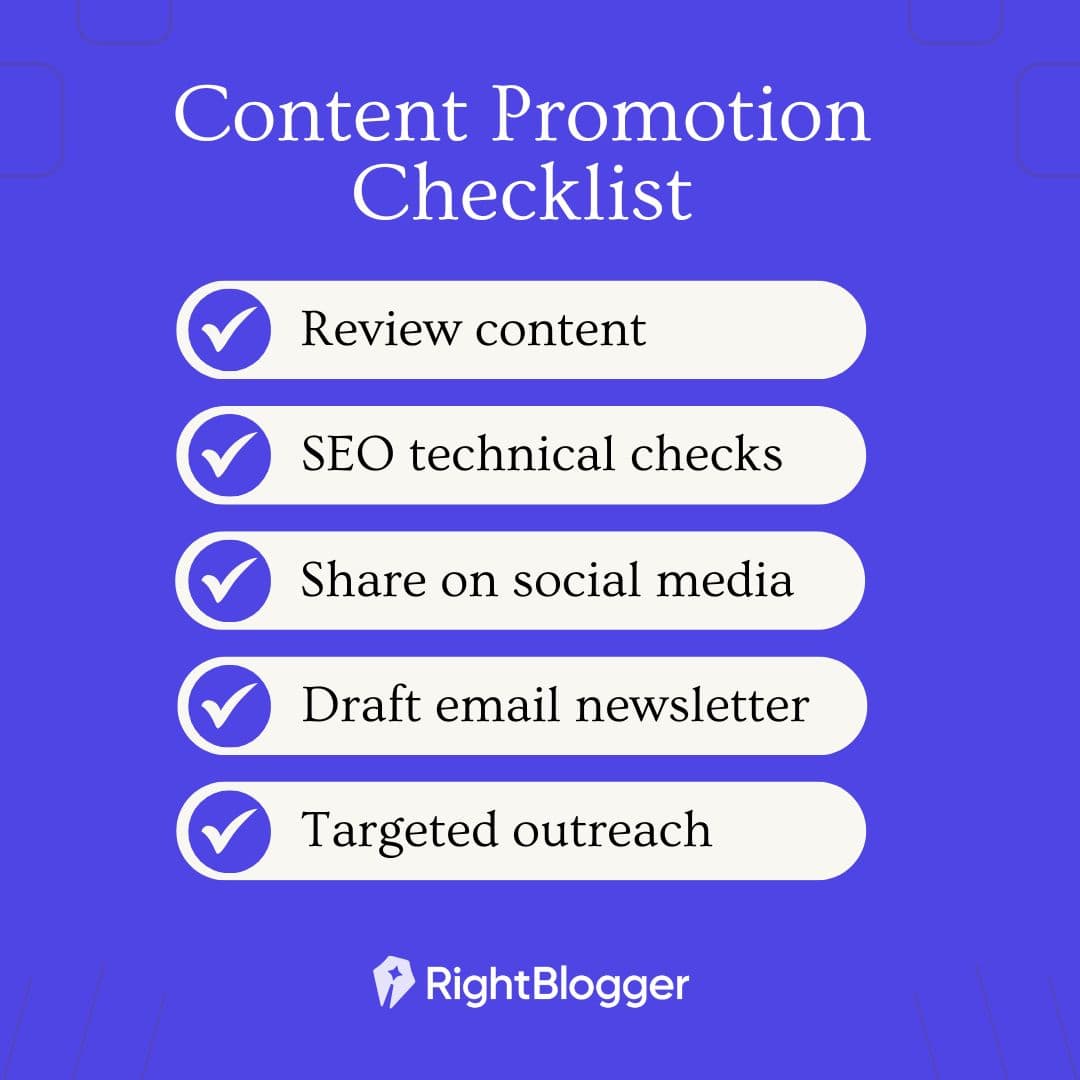
Alright, now let me walk you through each step of my content promotion checklist.
Before You Promote Anything, Get the Blog Basics Right
A content promotion checklist works best when your blog is set up to convert. That means a clean theme, fast pages, a clear niche, and an easy way for readers to subscribe.
If you’re still setting up your blog (or want to sanity-check the fundamentals), follow my step-by-step guide on how to start a blog before you go heavy on promotion.
1. Review Your Post Before Promoting
The first stop is reviewing your masterpiece. Picture this, your blog post is live for the world to see, only for you to later discover a glaring typo in the first paragraph. Cue facepalm 🤦♂️
To avoid these kinds of mishaps, I always give my post a full once-over read. Not obsessively, but enough to catch any sneaky errors I’ve made. This includes:
- Checking for Formatting Mistakes: Because nobody likes a cluttered post with disorganized headings, lists, or long blocks of text without a breather.
- Ensuring Calls-to-Actions and Buttons are Correct: CTAs are the gateways to engagement, but a broken button creates a bad user-experience.
- Verifying Links and Table of Contents: Because leading your readers to a 404 page is not exactly the adventure they signed up for.
I recommend walking away from your article for at least a few minutes, maybe stepping outside, and coming back to it with fresh eyes for your once-over. This’ll help you take your writing in more easily through the eyes of your readers.
2. Technical SEO Checks
Next up: a quick technical SEO check. You already know your blog’s SEO fundamentals matter, but how many of us actually double-check the key SEO elements before moving on to promotion?
That’s exactly why we built the handy RightBlogger Chrome Extension:

I use RightBlogger’s Chrome Extension to make sure my meta title, meta description, and technical tags are all in order, with just 1 click.
There’s a difference between just filling out these meta fields, and actually optimizing them to attract both readers and search engines. Trust me, taking a few minutes to do this can make a difference in your post’s visibility.
3. Sharing Your Content on (the Right) Social Channels
Sharing your content is not about plastering a link everywhere and hoping for the best. It’s about showing up on the platforms where your audience already spends time, with something worth clicking.
My approach to sharing:
- Pick 2-3 Platforms and Go Deep: Don’t spread yourself thin across every network. If your audience is on LinkedIn, write a native post summarizing your key takeaway. If they’re on Pinterest, create a pin graphic and use our Pinterest Pin Generator for the title and description. Reddit and Quora work well if you genuinely answer questions and link to your post as a source. Focus on the platforms where your readers already spend time.
- Embedding YouTube Videos: Got a video to go with your blog post? Embed it. This keeps readers on your page longer and opens up a second discovery channel on YouTube, the world’s second largest search engine. If you’re making YouTube Shorts, check out our guide on how to promote YouTube Shorts.
- Creating Short-Form Video for TikTok or Reels: Turn a key point from your post into a 30-second video. These platforms reward native content, and you can link back to the full post in your bio or comments.
4. Engage With Your Audience After Publishing
Congrats, your blog post is out in the wild! Now’s not the time to disappear on your people.

Stay engaged with your audience, by taking these actions:
- Monitoring Responses and Questions: Show your audience you’re not just a content robot. Be there to answer questions in the comments, on forums, and wherever you’re driving discussion around the topics of your post.
- Scheduling Email Newsletters: Your email list is your most reliable traffic source. Send a dedicated email or include the post in your next newsletter. Email subscribers convert at higher rates than any social channel.
- Engaging with Your Viewers: Ask a follow-up question, acknowledge good feedback, and pin the best comments. People come back to places where they feel heard.
5. Set a Reminder to Update Your Post
One of the greatest misconceptions about blogging, is that once you’ve published a new article, that post is set in stone.
Think again.
Updating your content over the coming months and years is what keeps it ranking in organic search. Google favors fresh, accurate content, and your readers will too:
- Setting Reminders for Regular Updates: Mark your calendar for a content check-up every 3-6 months. The more important the post feels to the overall goals of your site, the more frequently I recommend updating it.
- Using a WordPress Plugin to Track Last Updated Date: This little trick can help you keep tabs on when a post last got some love.
- Prioritizing Updates Based on Importance and Revenue Potential: Your top-traffic and top-revenue posts deserve the most attention. Check these first whenever you sit down to do updates.
You can use Google Search Console to spot which posts are losing traffic. For a deeper look at what’s working across your blog, see our guide on content performance analysis.
6. Repurpose Your Content
Your blog post shouldn’t live and die on one URL. Repurposing it across formats and platforms multiplies its reach without multiplying your effort. A few ways RightBlogger can help:
- Generating Social Media Post Ideas: Stuck on what to post on social? Let AI brainstorm for you. Learn more about AI tools for social media.
- Repurposing Content: A blog post can transform into a video script, an infographic, or social media snippets. Diversity is key to reaching more audiences.
- Pulling Quotes and Stats for Social Posts: Grab 3-4 strong lines or data points from your article and turn them into standalone social posts. Space them out over a few weeks to keep driving traffic long after publish day.
How to Promote a Blog Post: FAQs
How do you promote a blog post?
Promote a blog post by working through six steps after you publish: review the post for errors, run a quick technical SEO check, share it on two or three social channels where your audience already spends time, engage with everyone who comments or replies, set a reminder to update it every few months, and repurpose it into formats like video, email, and social snippets. The bloggers who do all six consistently are the ones whose traffic keeps climbing.
What is content promotion?
Content promotion is everything you do to get a piece of content in front of readers after you publish it. It covers on-page SEO checks, social sharing, email, community engagement, ongoing updates, and repurposing the post into new formats. Writing the post is half the work, and promotion is the half that actually earns the traffic.
How long should you promote a blog post?
Keep promoting a blog post for as long as it stays relevant, which usually means months, not days. The biggest mistake I see is publishing, sharing once, and moving on. Space your social posts out over weeks, send the post to your email list, and revisit it every three to six months so it stays fresh and keeps ranking.
How do you promote a blog post for free?
Every step in this checklist is free. You can review and optimize the post yourself, share it organically on social and in relevant communities, reply to comments, email your list, and repurpose the content into short videos or social snippets without spending a dollar. Free promotion trades money for consistency, so build it into a repeatable routine.
My Content Promotion Checklist + Key Takeaways
That’s my content promotion checklist. Six steps, nothing complicated, but the bloggers who actually do all six consistently are the ones whose traffic keeps growing month over month.
The biggest mistake I see? Publishing, sharing once on social media, and moving on. Promotion isn’t a one-day thing. It’s the work you do in the days, weeks, and months after you hit publish that determines whether a post gets 100 views or 100,000. If you’re still building your readership, check out our guide to growing an audience with proven strategies.
Start with the steps that feel easiest, build them into a habit, and keep experimenting with what works for your audience. You got this 💪

Article by
RightBlogger Co-Founder, Ryan Robinson teaches 500,000 monthly readers to grow online businesses. He is a recovering side project addict.


Automated SEO Blog Posts That Work
Try RightBlogger for free, we know you'll love it.





Leave a comment
You must be logged in to comment.
Loading comments...